
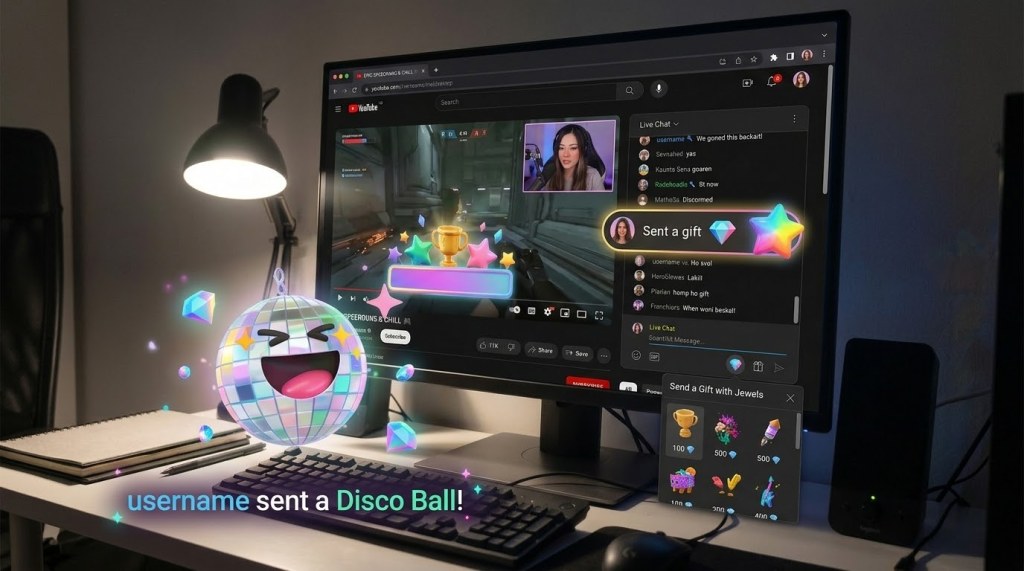
When YouTube first launched Gifts and Jewels, the immediate reaction from many established live streamers was to ignore them. For months, virtual gifts were treated as a vertical-only experiment—locked inside mobile viewing interfaces to compete with TikTok and Instagram Live.
If you produced high-production horizontal live streams using an encoder on a Mac or PC, gifts simply didn’t exist for your primary desktop audience.
Recently, YouTube quietly flipped the switch. YouTube Gifts are now officially supported on desktop horizontal live streams.
Whether you stream casually from an iPad or manage a multi-camera broadcast with dedicated switching software, your viewers on desktop browsers can now buy Jewels and send animated gifts directly into your live chat.
Here is everything you need to know about how the feature works, the payout conversion math, production overlay integrations, and the broader roadmap for virtual currency on YouTube.
1. What Changed: Desktop Browser Support
Previously, viewers tuning into desktop live streams could only support creators via traditional Super Chats, Super Stickers, and Channel Memberships. The gift tray was nowhere to be found.
With this update:
- Desktop viewers can click the $ (Dollar Sign) icon in the live chat window on any eligible horizontal stream.
- A dedicated Gift tray appears, allowing viewers to choose an animated gift.
- If a viewer doesn’t have enough virtual currency, they can purchase Jewel bundles directly within the desktop interface.
- The sent gift triggers an animated visual directly in the live chat stream.
This removes the device barrier completely, opening up fan-funding interactions to desktop viewers who typically watch longer and engage more deeply in tutorial, tech, gaming, and talk-show formats.
2. Super Chats vs. Gifts: The Gamification Shift
At Made on YouTube, platform executives highlighted a clear strategic focus: live stream gamification. Between new interactive tools like Live Showdowns and the expansion of virtual items, YouTube is pushing live chat away from passive observation toward active participation.
Gifts serve a fundamentally different psychological purpose than Super Chats:
- Super Chats are high-friction, formal transactions. Dropping $5, $20, or $50 puts a viewer in the spotlight, which can feel intimidating for casual participants.
- Gifts leverage virtual currency to lower that friction. Because viewers spend Jewels rather than seeing direct fiat currency deducted for every single sticker, the process feels playful, lighthearted, and communal.
3. The Payout Math: Converting Jewels to Rubies
The multi-currency terminology can seem confusing at first glance, but the creator payout formula is simple:
2 Jewels = 1 Ruby = $0.01 USD
- Jewels: The virtual tokens viewers purchase with real currency from YouTube.
- Gifts: The animated digital assets purchased with Jewels and posted to live chat.
- Rubies: The creator revenue share awarded when a gift is received.
For example, if a viewer sends a 1,000-Jewel gift, the creator receives 500 Rubies. At one cent per Ruby, that equals $5.00 USD.
While individual gifts represent micro-monetization, active streams can accumulate dozens of low-barrier gifts over the course of an hour, generating meaningful revenue that traditional Super Chats might have missed.
4. Production Workflows & Third-Party Overlays
For streamers who care about production value, desktop gifts are no longer confined to YouTube’s default chat window.
Third-party broadcast tools, browser sources, and overlay managers (such as Social Stream Ninja, Streamlabs, and Lumia Stream) are actively updating to read native YouTube gift events.
This enables creators to integrate desktop gifts directly into their broadcast environment:
- Display custom on-screen graphic alerts and popups when gifts land.
- Trigger unique audio stingers and sound effects.
- Tie gift triggers to physical DMX or smart studio lighting in your workspace.
5. What’s Next: Paid Hype on VODs
Virtual items aren’t stopping at live streams. During the Made on YouTube announcements, YouTube revealed that Jewels will soon tie directly into long-form video uploads through Paid Hype.
Currently, the Hype feature allows audiences to vote and boost videos that are less than 7 days old from channels with between 500 and 500,000 subscribers, pushing them onto dedicated discovery leaderboards.
Under the upcoming system, viewers won’t be capped at their weekly free hypes—they will be able to purchase additional hypes using Jewels. When spent on standard videos, those hypes will convert directly into Rubies for the creator. Enabling Virtual Items now prepares your channel for the monetization of standard uploads down the line.
6. How to Enable Gifts in YouTube Studio
If your channel is already part of the YouTube Partner Program (at least to the Fan Funding threshold), enabling Gifts takes less than a minute:
- Sign in to YouTube Studio.
- Select Earn from the left-hand navigation menu.
- Click the Supers & gifts tab along the top.
- Review and accept the Virtual Items (VI) Agreement if you haven’t already.
- Verify that the Gifts toggle switch is set to ON.
Once active, gifts are automatically enabled across all supported horizontal and vertical live broadcasts.
The Verdict
If you stream on YouTube and meet fan funding eligibility, there is no reason to leave Gifts turned off. The expansion to desktop brings higher-intent viewers into the fold, adds interactive energy to your live chat, and paves the way for upcoming upload-based monetization like paid Hype.
Check your Studio dashboard, make sure the toggle is active, and let your desktop audience join in on the fun.


Leave a Reply